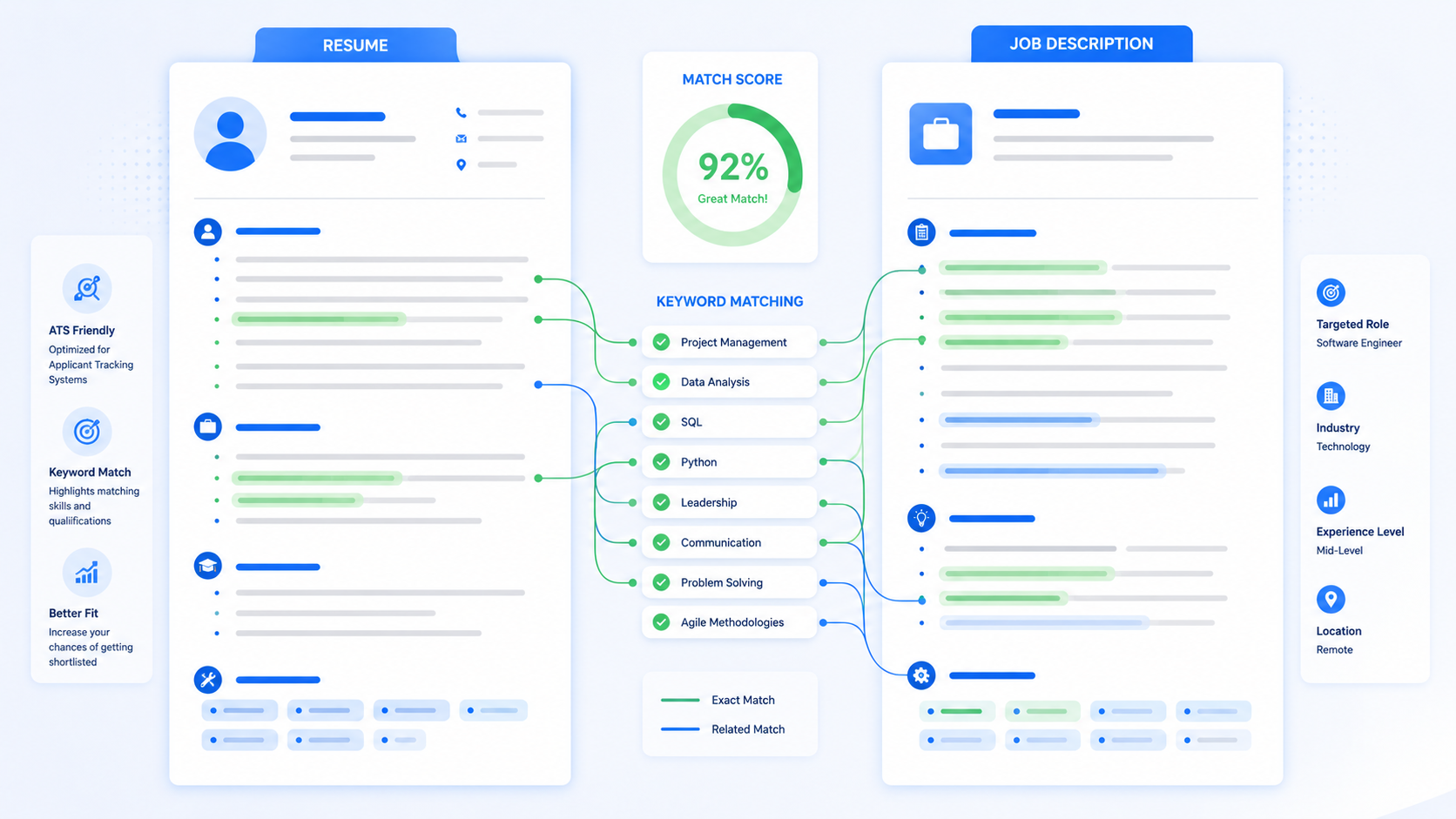
TL;DR
- Do not rewrite your whole resume for every job. Tailor the parts that matter most.
- Highlight required skills, repeated words, tools, certifications, and responsibilities in the job description.
- Use exact keywords only when they honestly match your background.
- Rewrite your summary to point toward the target role.
- Move the most relevant bullets higher under each job.
- Replace vague bullets with examples that show tools, scope, and results.
- Keep the layout ATS-friendly with standard headings and readable text.
Table of Contents
- Why matching your resume matters
- Step 1: Read the job posting correctly
- Step 2: Find the right keywords
- Step 3: Compare the job to your experience
- Step 4: Rewrite your summary
- Step 5: Tailor your bullet points
- Step 6: Update your skills section
- Before-and-after examples
- Resume matching checklist
- FAQ
Why Matching Your Resume Matters
Employers do not review your resume in isolation. They compare it to the job description. If the job asks for Excel reporting, customer onboarding, Salesforce, and stakeholder communication, those qualifications need to be easy to find if you have them.
Matching your resume to a job description helps in two ways. First, applicant tracking systems may parse and search for relevant terms. Second, recruiters can scan your resume faster and see why you fit the role.
SHRM's guidance on tailoring resumes for ATS review explains that keywords can appear throughout a job description and should be strategically dispersed through the resume. NACE's Job Outlook 2025 research also shows that employers look for evidence of abilities such as problem-solving and teamwork on resumes. That means tailoring is not only about software. It is about making your proof easier for people to see.
Good tailoring is honest. It does not mean pretending to be someone else. It means presenting your real experience in the most relevant way.
Step 1: Read the Job Posting Correctly
Most job seekers skim postings too quickly. To tailor your resume well, slow down and mark the parts that matter.
Look for five types of information
- Job title and level: coordinator, analyst, assistant, associate, manager, intern, entry-level.
- Required skills: must-have qualifications listed by the employer.
- Preferred skills: nice-to-have qualifications that can still strengthen your resume.
- Tools and systems: software, platforms, equipment, or methods.
- Outcomes: what the person will improve, manage, support, create, analyze, or deliver.
Do not treat every word equally. A skill mentioned three times matters more than a minor detail buried near the bottom.
Example job description clues
| Posting language | What it tells you | Resume response |
|---|---|---|
| Prepare weekly KPI reports | Reporting and metrics matter | Include Excel, dashboards, KPIs, or reporting bullets |
| Coordinate with sales and operations | Cross-functional communication matters | Show team coordination and stakeholder updates |
| Experience with Salesforce preferred | CRM knowledge helps | Add Salesforce if you used it; do not fake it |
| Resolve customer escalations | Problem-solving under pressure matters | Show examples of handling issues or complaints |
Step 2: Find the Right Keywords
Resume keywords are the words and phrases that connect your experience to the job. They can include hard skills, tools, credentials, responsibilities, industries, and job titles.
Common keyword categories
- Technical tools: Excel, SQL, Python, Salesforce, HubSpot, QuickBooks, Tableau
- Methods: data analysis, project management, customer onboarding, market research
- Credentials: CPA, SHRM-CP, PMP, CNA, CompTIA Security+
- Soft skills with evidence: teamwork, communication, leadership, problem-solving
- Industry terms: SaaS, healthcare administration, logistics, retail operations, financial reporting
Indeed's resume keyword guidance recommends reading the job post first to determine which keywords and phrases to include. That is the right approach. Start with the employer's language, then decide which words honestly match your background.
Do not keyword stuff
Keyword stuffing makes a resume harder to read. It can also create problems in interviews when you are asked about skills you listed casually.
Bad: Skills: Excel, Excel reporting, advanced Excel, KPI Excel dashboard, reporting Excel, Microsoft Excel analysis.
Better: Skills: Excel, KPI reporting, pivot tables, dashboard updates, data analysis.
Step 3: Compare the Job to Your Real Experience
Once you identify the job's most important requirements, compare them to your actual background. The easiest way is to make a two-column list.
Simple matching table
| Job requirement | Your proof |
|---|---|
| Customer onboarding | Trained new users during internship; created welcome checklist |
| Excel reporting | Built weekly spreadsheet for inventory and sales totals |
| Written communication | Wrote customer email templates and meeting notes |
| Problem-solving | Resolved order errors and escalated billing issues |
This step prevents dishonest tailoring. If you do not have Salesforce experience, do not list Salesforce. If you have used another CRM, say that. If you have adjacent experience, frame it honestly.
What if you are missing a requirement?
If you meet most of the job but miss one preferred skill, you may still apply. Use adjacent proof.
Example: If the job asks for HubSpot and you used Salesforce, write about CRM data entry, pipeline updates, and customer records. Do not claim HubSpot if you have not used it.
Step 4: Rewrite Your Summary
Your resume summary is one of the easiest places to tailor. It should point directly at the role and include two or three of the employer's most important needs.
Generic summary
Motivated professional with strong communication skills and experience in business operations.
Tailored summary for operations coordinator
Operations coordinator with experience updating vendor records, preparing weekly Excel reports, and coordinating cross-functional follow-up between sales, support, and warehouse teams.
The tailored version works better because it names the target function and includes job-relevant proof.
Tailored summary for student internship
Business analytics student seeking a data analyst internship, with coursework in statistics and SQL plus class projects using Excel pivot tables, dashboards, and trend analysis.
That summary helps both ATS and recruiter review because it includes role, field, tools, and proof.
Step 5: Tailor Your Bullet Points
Tailoring bullet points does not mean inventing new experience. It means choosing the most relevant proof and writing it in the employer's language.
Use this bullet formula
Action verb + relevant task + tool/skill + outcome or scope.
For example:
Before: Helped with reports.
After: Prepared weekly Excel reports tracking order volume, late shipments, and inventory issues for operations manager review.
The tailored bullet adds tool, metrics, business area, and audience.
Move relevant bullets higher
You do not always need to write new bullets. Sometimes you need to reorder them. If the job emphasizes reporting, put your reporting bullet above a less relevant customer service bullet. If the job emphasizes training, put training and documentation bullets higher.
Use the same job title carefully
If your official title was "Customer Care Associate" and the job description says "Customer Support Specialist," do not change your title dishonestly. Instead, use the target phrase in the summary or bullets.
Example: Customer care associate with experience handling customer support requests through email, chat, and phone.
Step 6: Update Your Skills Section
Your skills section should reflect the job description. It should not be a dumping ground for every skill you have ever used.
Before tailoring
Skills: communication, Microsoft Office, leadership, teamwork, organization, problem-solving, social media, data entry
After tailoring for marketing coordinator
Skills: campaign coordination, Canva, Google Sheets, social media scheduling, competitor research, content writing, email marketing, event support
The second skills section is more specific. It helps the reader understand what kind of work you can do.
Group skills when helpful
Technical: Excel, SQL, Tableau, Python
Marketing: Canva, social media scheduling, email campaigns, competitor research
Operations: inventory tracking, vendor communication, KPI reporting, process documentation
Before-and-After Resume Matching Examples
Example 1: Administrative assistant job
Job description asks for: scheduling, Microsoft Office, data entry, phone communication, file organization.
Before: Worked in front office and helped staff.
After: Managed appointment scheduling, answered phone inquiries, updated Excel tracking sheets, and organized digital files for a five-person office team.
Example 2: Entry-level software role
Job description asks for: JavaScript, APIs, GitHub, debugging, responsive design.
Before: Built web projects for class.
After: Built responsive JavaScript web app using API data, GitHub version control, and browser debugging tools to improve form validation and page performance.
Example 3: Customer success role
Job description asks for: onboarding, CRM, customer retention, product education, cross-functional communication.
Before: Helped customers learn product features.
After: Guided new customers through onboarding steps, documented account notes in CRM, and shared recurring product questions with support and sales teams.
Example 4: College internship
Job description asks for: research, presentations, Excel, teamwork, written communication.
Before: Completed business class project.
After: Researched three competitors, summarized pricing trends in Excel, and presented recommendations with a four-person team in a 10-slide report.
What Not to Do When Matching a Resume
Do not copy the job description into your resume
Recruiters can spot copied language. Use the employer's keywords, but write your own evidence.
Do not claim skills you do not have
If you list a tool, be ready to discuss how you used it. If you only watched a tutorial, do not present it as work experience.
Do not remove all personality
A tailored resume should still sound like you. Clear and specific is better than stiff and robotic.
Do not tailor only the skills section
Keywords in a skills list help, but bullets prove them. Put important keywords in context.
Resume Matching Checklist
- Did you identify the top 5-8 requirements in the job description?
- Did you include honest matching keywords in your summary, skills, and bullets?
- Did you move the most relevant experience higher?
- Did you cut unrelated details?
- Did your bullets show tools, scope, and outcomes?
- Did you use standard ATS-friendly headings?
- Did you avoid keyword stuffing?
- Can you explain every skill listed?
- Did you save the final resume in the employer's requested format?
How AICV Create Helps Match Your Resume to a Job
AICV Create helps you compare your resume to a job description, identify missing or weak wording, improve bullet points, and build an ATS-friendly version. Instead of manually guessing which words matter, you can focus on showing your real experience clearly.
This is useful for students applying to internships, career changers translating old experience, and professionals applying to roles with specific tools or responsibilities.
FAQ
How do I match my resume to a job description?
Read the posting, identify required skills and repeated keywords, compare them to your real experience, then update your summary, skills, and strongest bullets to reflect the role.
Should I copy keywords from the job description?
Use exact keywords when they truthfully match your background, but do not copy large sections or add skills you cannot explain.
How much should I tailor my resume for each job?
Tailor the summary, skills section, and top bullets. You usually do not need to rewrite the entire resume.
Does tailoring a resume help with ATS?
Yes. Tailoring helps applicant tracking systems and recruiters see relevant skills, tools, titles, and responsibilities that match the job description.
What if I do not have every required skill?
Focus on the requirements you do meet and show adjacent experience. Do not claim skills you do not have.
Can AICV Create match my resume to a job description?
AICV Create can help compare your resume wording to a job description, improve bullets, and create a cleaner ATS-friendly version.
Conclusion
Matching your resume to a job description is one of the highest-impact resume edits you can make. It helps ATS systems parse the right terms and helps recruiters see your fit quickly.
The key is to tailor honestly. Use the job description to guide your summary, skills, and strongest bullets. Add relevant keywords in context. Remove details that do not support the role. Keep the format clean.
If you want to speed up the process, use AICV Create to compare your resume with a job posting, improve your wording, and download an ATS-friendly resume that is ready to send.